Popular Vendors
Demo Microsoft DP-300 Exam Questions
Demo practice questions for guest users.
Question 1
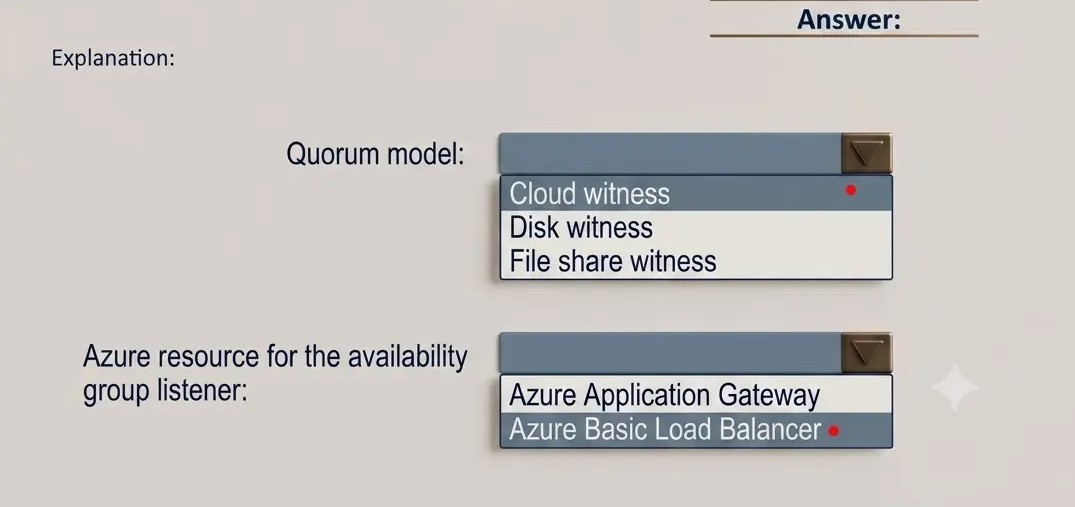
You need to recommend a configuration for ManufacturingSQLDb1 after the migration to Azure. The
solution must meet the business requirements.
What should you include in the recommendation? To answer, select the appropriate options in the
answer area.
NOTE: Each correct selection is worth one point.
Correct Answer: A
Explanation:
Scenario: Business Requirements
Scenario: Business Requirements
Litware identifies business requirements include: meet an SLA of 99.99% availability for all Azure
deployments.
Box 1: Cloud witness
If you have a Failover Cluster deployment, where all nodes can reach the internet (by extension of
Azure), it is recommended that you configure a Cloud Witness as your quorum witness resource.
Box 2: Azure Basic Load Balancer
Microsoft guarantees that a Load Balanced Endpoint using Azure Standard Load Balancer, serving two
or more Healthy Virtual Machine Instances, will be available 99.99% of the time.
Note: There are two main options for setting up your listener: external (public) or internal. The
external (public) listener uses an internet facing load balancer and is associated with a public Virtual
IP (VIP) that is accessible over the internet. An internal listener uses an internal load balancer and
only supports clients within the same Virtual Network.
Question 2
You need to identify the cause of the performance issues on SalesSQLDb1.
Which two dynamic management views should you use? Each correct answer presents part of the
solution.
NOTE: Each correct selection is worth one point.
Correct Answer: A, E
Explanation:
Note: Depending on the system you’re working with you can access these wait statistics from one of