Popular Vendors
Demo Microsoft AZ-204 Exam Questions
Demo practice questions for guest users.
Question 1
You need to support the requirements for the Shipping Logic App.
What should you use?
Correct Answer: D
Explanation:
Before you can connect to on-premises data sources from Azure Logic Apps, download and install the
Before you can connect to on-premises data sources from Azure Logic Apps, download and install the
on-premises data gateway on a local computer. The gateway works as a bridge that provides quick
data transfer and encryption between data sources on premises (not in the cloud) and your logic
apps.
Logic Apps Enterprise Integration pack bring some of the enterprise B2B capabilities like AS2 and
X12, EDI standards support
Scenario: The Shipping Logic app must meet the following requirements:
Support the ocean transport and inland transport workflows by using a Logic App.
Support industry-standard protocol X12 message format for various messages including vessel
content details and arrival notices.
Secure resources to the corporate VNet and use dedicated storage resources with a fixed costing
Question 2
DRAG DROP
You need to support the message processing for the ocean transport workflow.
Which four actions should you perform in sequence? To answer, move the appropriate actions from
the list of actions to the answer area and arrange them in the correct order.
Correct Answer: A
Explanation:
Step 1: Create an integration account in the Azure portal
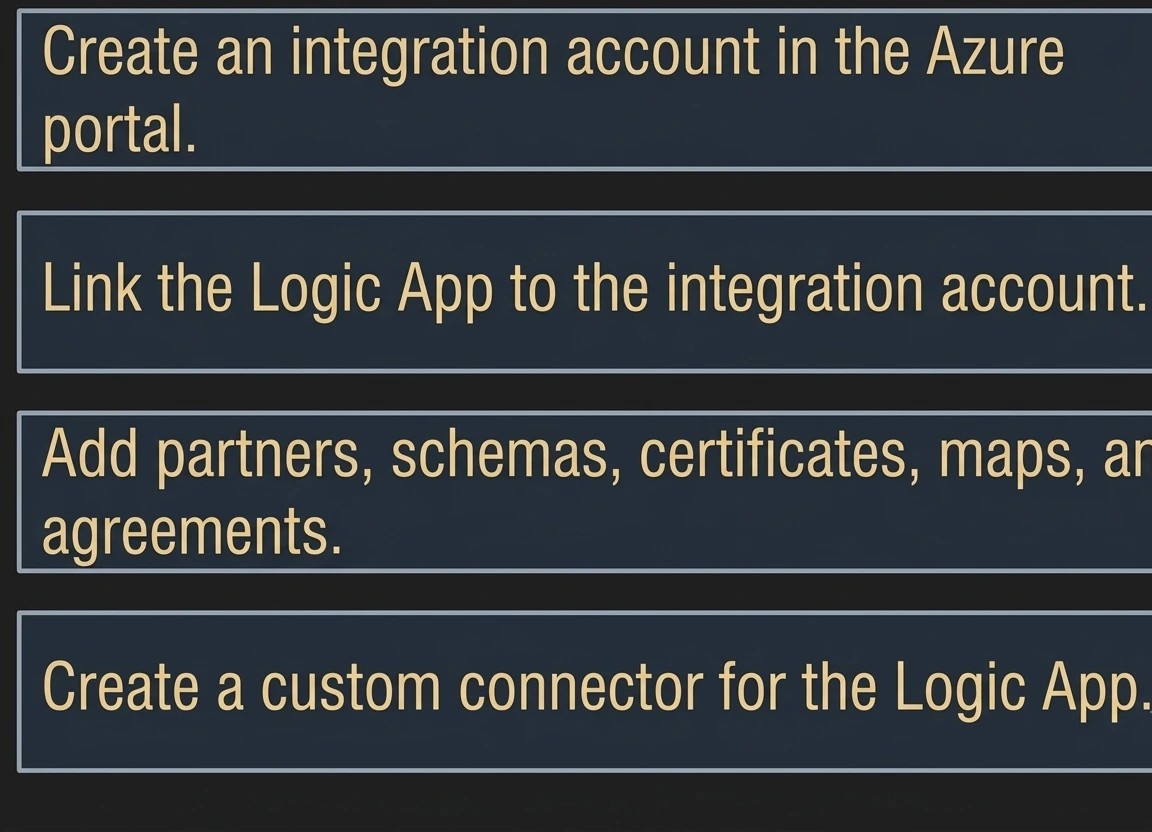
Step 1: Create an integration account in the Azure portal
You can define custom metadata for artifacts in integration accounts and get that metadata during
runtime for your logic app to use. For example, you can provide metadata for artifacts, such as
partners, agreements, schemas, and maps - all store metadata using key-value pairs.
Question 3
You need to secure the Shipping Logic App.
Correct Answer: C
Explanation:
Scenario: The Shipping Logic App requires secure resources to the corporate VNet and use dedicated