Demo UiPath UiPath-ARDv1 Exam Questions

Demo practice questions for guest users.

Section: Practice Mode 3 Questions
Demo Practice
Question 1

A developer plans to create a process to automate a web application. The web application requires
HTML buttons and text boxes to be loaded. Although some assets may still be loading, the robot
should perform the UI actions once the buttons and text boxes are loaded.
Which property should be configured?

Correct Answer: D
Explanation:

The correct answer is D. WaitForReady = Interactive. In UiPath web automation, the WaitForReady property controls how the robot waits for a web page or UI element to be ready before performing an action. When set to Interactive, UiPath waits only until the essential UI elements such as HTML buttons and text boxes are loaded and ready for interaction, even if other page assets like images, scripts, or background elements are still loading. This makes it ideal for modern web applications where the visible and clickable elements appear earlier than the full page load. In this scenario, the requirement is specifically that the robot should perform actions as soon as buttons and text boxes are available, not wait for the entire page to finish loading. Therefore, Interactive mode ensures faster execution while still maintaining reliability by acting only when the required UI elements are ready. The other options are incorrect because Complete waits for the entire page to fully load, which is slower and unnecessary here, while TimeoutMS settings only control maximum waiting time and do not determine readiness of UI elements. Hence, WaitForReady = Interactive is the most suitable choice.
Question 2

A developer reviewed the following sequence:
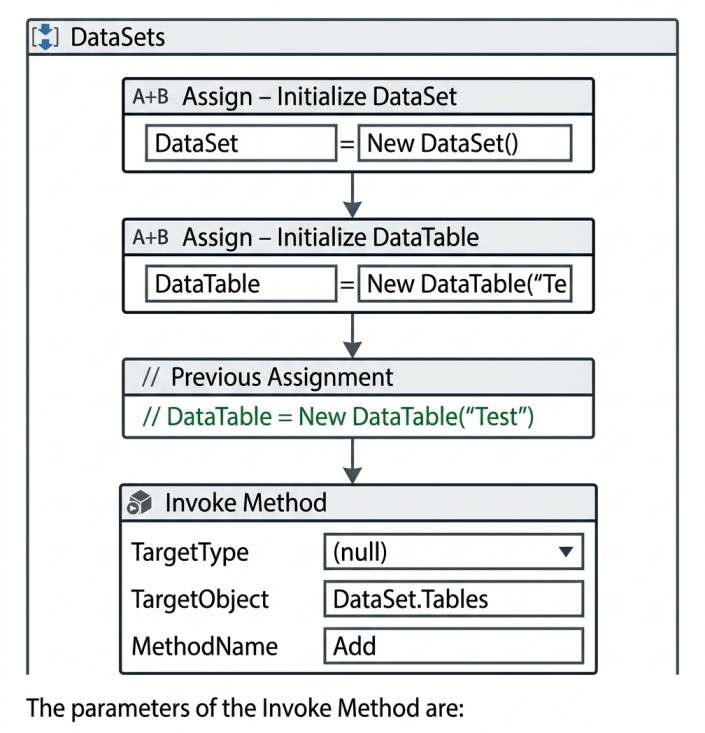

In order to get the table name of the first element in the DataSet, which expressions should the
developer use? 

Correct Answer: C
Explanation:
In a DataSet, data is organized into multiple DataTables, and each table is stored inside the Tables collection. This collection is zero-indexed, meaning the first table is accessed using index 0, not 1. To retrieve the name of the first table, the correct expression is DataSet.Tables(0).TableName, which directly accesses the first DataTable and then reads its TableName property.
Option C (DataSet.Rows(0).TableName) is incorrect because a DataSet does not have a direct Rows collection. Rows belong to a DataTable, not to the DataSet itself. Therefore, you cannot access table information through Rows.
Similarly, options B and D are incorrect because they use index 1, which refers to the second table in the DataSet, not the first one.
So, the correct and valid expression to get the name of the first table is DataSet.Tables(0).TableName.

Question 3

A developer was reviewing an Orchestration process whose "main" attribute is set to Main.xaml in project.json.
However, the process is not pausing as intended. What is a possible cause for this issue?.

Correct Answer: D
Explanation:

In an Orchestration process, the workflow only pauses when the Wait for Form Task and Resume activity is executed within the correct execution path of the running workflow (typically the main orchestration flow or the specific invoked state machine/sequence handling the task). If the process is not pausing as expected, a common reason is that the activity is placed in a different XAML file (such as GetApproval.xaml) that is not currently active in the execution flow, or is not properly invoked from Main.xaml. In that case, the orchestration never reaches the point where it should pause, so the expected suspension does not happen.

Demo Practice Mode

You are viewing only the questions marked as Demo.

BACK TO EXAM